

Keys or fobs? Choosing access control for a small business
Cards, fobs and codes can be switched off the moment someone leaves, and they record who opened which door. Here's what a small business system involves and where to start.
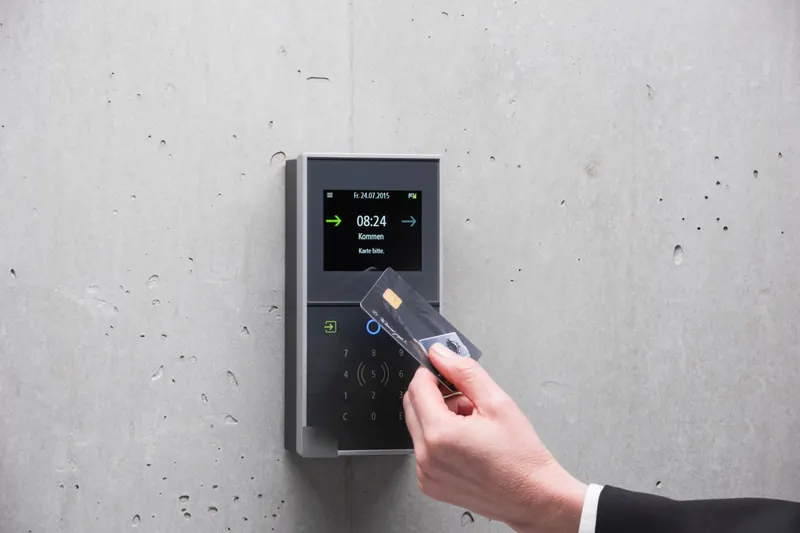
Here's what that involves, how it compares with rekeying when staff leave, and what a Winnipeg winter means for the hardware on an outside door.
What problem does access control solve?
Keys you can't take back. Every key you hand out is a copy you can't track. Staff leave, keys get lent to a cleaner or a contractor, and someone gets a copy cut at a hardware store "just in case". After a few years, nobody knows how many working keys exist for the back door.
With cards or fobs:
- Turning someone off takes seconds. Delete the credential and it stops working.
- Lost cards are a minor problem. Disable it and issue a new one; nobody has to rekey anything.
- You get a record. Most systems log each opening by person and time, which helps when stock goes missing or the alarm went off at 3am.
- Schedules are possible. The front door can unlock for business hours and lock itself at close, and a cleaner's fob can work only on their evenings.
Should I rekey or switch to access control when staff leave?
It depends on how often it happens and how many doors are involved.
| Situation | Usually the better fit |
|---|---|
| A very small team, low turnover, one or two doors | Rekey when someone leaves without returning a key; consider restricted keys so copies can't be cut freely |
| Regular staff turnover, shifts, or part-time staff | Access control on the main doors, so leavers are switched off the same day |
| Several doors with different people allowed in each | Access control, or a master key system if you prefer keys |
| Stockroom, cash office or server closet | Access control, for the audit trail |
Many businesses do both: access control on the doors people use every day, and good mechanical locks on the rest. Our post on rekey vs replace locks explains the rekey side.
Call or text and a person answers, 24 hours, 7 days. You approve the price before we start.
What does a basic system include?
Four parts, whichever brand you choose:
- A reader on the outside of the door: a card or fob reader, a keypad, or both.
- A controller that decides whether a credential is allowed at that moment.
- Locking hardware on the door: usually an electric strike in the frame, an electrified lock or an electrified exit device, and sometimes a magnetic lock.
- Software where you add and remove people, set schedules and read the logs.
Small systems can be a single standalone lock with the reader and controller built in. Larger ones wire each door back to a central controller.
Cloud or on-site management?
Both work. The difference is where the software lives.
- On-site: the software runs on a computer or panel in your building. You manage it there, and it doesn't depend on the internet.
- Cloud: you manage users and doors from a website or phone app, from anywhere. Handy if you run two locations, or you're the owner who gets the "I forgot my fob" call on a Sunday.
Ask how each option handles an internet outage, who can add users, and how long logs are kept.
Will card readers and electric strikes work in a Winnipeg winter?
Outside doors here go through weeks below minus 30, blowing snow, and salt carried in on boots. The hardware has to be rated for the conditions it will actually face, and that differs from product to product, so check the maker's ratings for each part before it goes on an exterior door.
Things that make a real difference in winter:
- The door closing properly. A door that doesn't fully latch because the closer is sluggish in the cold, or the frame has shifted, won't lock however good the reader is.
- The strike and latch lined up. Frost heave moves frames. A strike that's slightly off loads the latch and causes failures.
- The reader out of the worst weather where possible, or protected by a vestibule or overhang.
What about fire code and getting out?
People inside must always be able to get out, whatever the access system is doing. That's the most important rule in any access control job.
Electrified hardware comes in two kinds. As Allegion explains, "fail safe products are unlocked when power is removed" and "fail secure products are locked when power is removed" (Allegion). The same source notes that most electrified hardware still lets people exit freely either way, while magnetic locks don't provide free egress on their own and need release devices.
Which hardware a door needs depends on the building, the door and the applicable codes. Required exits, fire doors and doors with panic hardware need particular care, and changes may need sign-off. Plan this with your installer and, where needed, the building owner before any hardware is bought.
What should I have ready for a site visit?
A short list makes the first visit useful:
- The doors: which ones, and what's on them now (lever, deadbolt, storefront lock, panic bar). Our guide to commercial door lock types helps you name them.
- The people: roughly how many staff, contractors and cleaners need access, and to which doors.
- The schedule: business hours, shifts and who opens and closes.
- The building: whether you own or lease, and the landlord's contact if you lease. Check whether your lease needs the landlord's agreement for door hardware changes.
- Power and network: where the nearest outlet and internet connection are to each door.
If you also manage rental units, the key control habits in change locks after tenant moves out apply to staff keys too.
When you're ready, our card and fob access control page explains how we set up a system with you.
The short version
- Access control lets you switch off a card or fob the moment someone leaves.
- Start with the main entrance and the doors that matter most.
- Keep a mechanical key override.
- Exits must always open from the inside. Plan egress before buying hardware.
Questions people ask
- What is the cheapest kind of access control?
- The simplest setup is a standalone keypad or card lock on one door, managed at the lock itself. It's the least expensive to start with but the hardest to manage as you grow. Networked and cloud systems cost more up front and save time when staff change often.
- Can I add access control to my existing doors?
- Usually, yes. Many systems work by fitting an electric strike or electrified lock to the existing door and frame, plus a reader on the outside. The door's condition, the frame and whether power can be run to it all decide what fits.
- What happens to access control in a power outage?
- It depends on how each door is set up. Fail-safe hardware unlocks when power is removed, and fail-secure hardware stays locked. Many systems add a backup battery, and most keep a mechanical key override so you can still get in.
Ready to sort it? Call or text.
Open 24 hours, 7 days. Text a photo first if that is easier.
Card and fob access control · You approve the price before we start.
Keep reading
All guides Plan ahead
Commercial door lock types: a plain guide for business owners
Most business doors use one of four lock types. Here's how to tell them apart, which suits which door, and what BHMA grades and interchangeable cores mean.
 Right now
What to do after a break-in: the first 24 hours
A break-in turns an ordinary day upside down. Here is the order to do things in, from the first phone call to a door that locks properly tonight.
 Plan ahead
The best garage door for a Winnipeg winter: insulation, R-value and seals
Shopping for a garage door that copes with a prairie winter? Here is what actually keeps the cold out, how to read R-value and U-factor, and when an old door is done.